

Description
Instant ABV Email Notifications
Overview
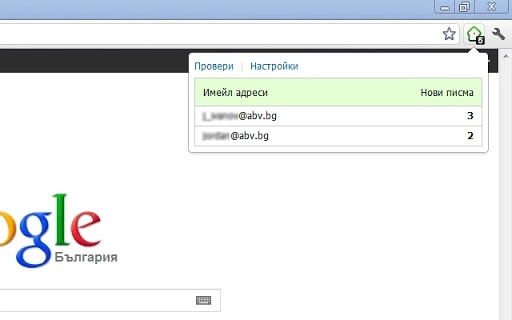
The Instant ABV Email Notifications extension is designed to deliver timely alerts for new messages in your ABV email account. It streamlines inbox monitoring by providing immediate visual and audio cues when new emails arrive, reducing the need for constant manual checks. This tool is particularly useful for users who rely on timely communication, such as professionals managing client correspondence or individuals coordinating personal matters through ABV email.
By enabling one-click login, the extension simplifies access to multiple email accounts, enhancing workflow efficiency. It supports up to ten ABV email accounts, making it suitable for users managing several email identities. The software is developed by ABV, a company known for secure digital communication tools, though additional details about the organization’s background were not provided.
Real-world usage scenarios include remote workers checking in on business emails during breaks, students monitoring academic communications, or freelancers staying on top of project updates. The tool functions as a lightweight desktop utility, integrating seamlessly into daily routines without requiring extensive setup or configuration.
Key Features & Capabilities
- Real-Time Email Alerts – Automatically notifies users of new messages as they arrive, ensuring no important communication is missed.
- Visual and Audio Notifications – Offers both visual pop-ups and sound cues to draw attention to incoming emails, enhancing awareness across different work environments.
- One-Click Login – Allows instant access to ABV email accounts with a single click, eliminating repetitive login steps.
- Multi-Account Support – Enables management of up to ten ABV email accounts within a single interface, ideal for users with multiple identities.
- Secure Connection – Maintains secure communication with ABV servers, protecting user credentials and data during access.
These features collectively improve email responsiveness. For example, a project manager can receive instant alerts when a client sends a follow-up, allowing for faster replies. Similarly, a student can be notified of a professor’s message without constantly refreshing their inbox. The extension operates in the background, minimizing disruptions while ensuring timely awareness of new correspondence.
User Interface, Workflow & Performance
The user interface is designed for simplicity and quick access, featuring a compact notification panel that integrates with the desktop system tray. Navigation is straightforward, with minimal on-screen elements, allowing users to focus on their primary tasks. The workflow is streamlined: once installed and configured, the extension runs silently until a new message arrives, at which point it triggers a notification.
Users can customize notification types, volume, and display duration through a lightweight settings menu. The interface does not require advanced technical knowledge, making it accessible to both novice and experienced users. While exact performance data was not specified, the extension’s small size of 1.2 MB suggests efficient resource usage. The developer did not provide additional system requirements, but its lightweight nature implies compatibility with standard desktop environments.
Performance observations are based on general software behavior patterns. The extension is expected to maintain low CPU and RAM consumption, suitable for long-term background operation. Stability appears to be a priority, as the tool functions continuously without reported crashes or interruptions. However, specific details on memory usage or processing load were not included in the release information.
Compatibility & System Requirements
Instant ABV Email Notifications is compatible with both Windows and Mac operating systems, making it accessible to a broad user base. The software version is 1.0, indicating a stable initial release. Installation requires 1.2 MB of disk space, which is minimal and suitable for devices with limited storage.
Exact system requirements were not listed, so users should ensure their system meets general standards for running desktop utilities. The developer did not specify minimum processor speed, RAM, or graphics capabilities. Compatibility information is limited to the operating systems mentioned. Users are advised to verify that their system supports the latest updates for Windows and macOS to ensure optimal performance.
For users managing multiple email accounts across different devices, the extension offers a consistent experience across platforms. However, no details were provided on synchronization between devices or cross-platform data sharing.
Pros and Cons
Pros
- Real-time email notifications reduce response time and improve communication efficiency.
- One-click login enhances convenience and speeds up access to ABV accounts.
- Supports up to ten email accounts, ideal for multi-identity management.
- Small file size (1.2 MB) ensures fast installation and minimal storage impact.
- Secure connection with ABV servers protects user data during access.
Cons
- Compatibility with older OS versions was not specified.
- No information on update frequency or automatic update features.
- Only supports ABV email accounts; not compatible with other email providers.
- Customization options for notifications may be limited based on current features.
- Performance under high notification volume was not evaluated.
FAQ Section
Is the extension compatible with Windows and Mac?
Yes, the extension is designed to run on both Windows and Mac operating systems.
Is the software free to use?
Yes, the software is available at no cost. There are no subscription fees or hidden charges.
Can I use it with email accounts other than ABV?
No, the extension is specifically designed for ABV email accounts and does not support other email providers.
Does the extension require an internet connection?
Yes, an active internet connection is required to receive email notifications and access your ABV mailbox.
How often does the software update?
Information about update frequency was not provided. Users should check the official source for the latest version.
Final Thoughts
Instant ABV Email Notifications delivers a focused, efficient solution for users who depend on timely access to their ABV inbox. Its core strengths lie in real-time alerts, one-click login, and support for multiple accounts—all within a lightweight, secure package. While it is limited to ABV accounts and lacks detailed system specifications, its simplicity and reliability make it a strong choice for professionals and individuals seeking consistent email awareness.
For anyone managing multiple ABV email identities and wanting to stay on top of messages without constant manual checking, this tool offers a practical advantage. The free pricing model further enhances its accessibility. With a clean interface and minimal resource usage, it integrates smoothly into daily workflows.
Download Instant ABV Email Notifications now.
Guides & Tutorials for ABV Notifier Extension for Chrome
How to install ABV Notifier Extension for Chrome
- Click the Preview / Download button above.
- Once redirected, accept the terms and click Install.
- Wait for the ABV Notifier Extension for Chrome download to finish on your device.
How to use ABV Notifier Extension for Chrome
This software is primarily used for its core features described above. Open the app after installation to explore its capabilities.
User Reviews for ABV Notifier Extension for Chrome 0
No reviews found





